I picked up the Apple Watch workout-tracking MVP in BetterFit and then pushed on the part that matters during exercise: how many things do I have to tap just to record a set? The first pass had the controls, but using it on the 40 mm simulator made the amount of scrolling hard to ignore.
I compared Strong's focused set screen and Crown editing with Hevy's automatic rest timer. The change I wanted was a pinned Log Set action. Recording the displayed targets should take one tap; changing them can open an editor with the Crown and large plus/minus buttons. Pause, undo and rest preferences live in Actions.
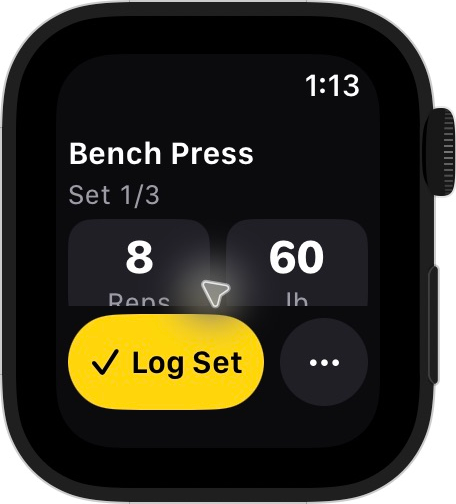
Local 40 mm watch simulator prototype with bundled workout targets, not a real workout record or a released watch app.
Rest starts automatically after logging, alongside the next set. It does not replace that set with a countdown screen that needs dismissing before I can record anything else. Undo restores the last set with its edited values. The logging method also checks the displayed set's ID, so a repeated tap on an old control cannot accidentally complete the next set.
The timing belongs to the session model rather than the screen. Rest uses active workout time, so Pause freezes both clocks, disables value editing and turns the primary action into Resume. Large Dynamic Type stacks the values, while the main action stays pinned. VoiceOver labels and adjustable actions provide alternatives to relying on colour or the Crown alone.
The local run passed 95 existing tests plus ten session tests, the watchOS simulator build and strict lint on the seven focused files. The full repository lint still reports existing violations. I checked the small simulator and a large-text launch, but that is not a physical-watch usability test. Haptics and Double Tap still need supported hardware.
The changes remain local and unmerged. This MVP logs manually from three bundled templates and saves completed workouts locally; it does not record HealthKit workouts or sync with the iPhone yet.